

When you switch from Mailchimp to MailerLite, the work is mostly a data-handling job, not a technical one. MailerLite has a built-in Mailchimp import tool, and its official help center documents the whole process. The risk is not the move itself. The risk is forgetting a form on your website, losing your unsubscribe history, or canceling Mailchimp before your new setup is tested.
This guide is built from official Mailchimp and MailerLite documentation, linked and dated below. Steps we could not confirm in official docs are marked ‡.
Disclosure: This article may contain affiliate links. If you buy through them, we may earn a commission at no extra cost to you. It never affects our rankings or verdicts. Learn more →
Before you start
Why people are switching in 2026. Mailchimp’s free plan is now limited to 250 contacts and 500 emails per month, and automation flows can’t be switched on without a paid plan (we confirmed both in a free account in November 2026). Paid plans start at $13/month for Essentials and $20/month for Standard at 500 contacts (regular price after the 12-month intro discount), and climb steeply with list size (mailchimp.com/pricing, checked November 6, 2026). MailerLite’s free plan covers 250 subscribers and 2,500 monthly emails, and its paid Comfort plan starts at $12/month (mailerlite.com/pricing, accessed 2026-10-16). For a wider view of the market, see our Mailchimp alternatives roundup.
Check three things before you touch anything:
- List hygiene. Export first, then decide which contacts are worth moving. Old, disengaged contacts hurt deliverability on a new platform from day one.
- Export rights. Per Mailchimp’s help documentation, only account Owners and Admins can export a full audience. Confirm your user level before you start.
- Timing. Do not cancel Mailchimp until MailerLite is fully tested. Create your MailerLite account a few days before you plan to migrate, so you have time to finish setup and domain authentication.‡
The checklist to switch from Mailchimp to MailerLite
Print this or paste it into your task manager. Steps marked “doc-based” follow official help-center instructions.
Phase 1 — Export from Mailchimp
- ☐ 1. Export your full audience. In Mailchimp: Audience → All contacts → Export Audience. Mailchimp emails you a download link for a ZIP file containing separate CSVs by status: subscribed, unsubscribed, non-subscribed, and cleaned. (Doc-based: Mailchimp help — export your contacts, accessed 2026-10-16.)
- ☐ 2. Keep every status file. Do not discard the unsubscribed and cleaned CSVs. They are your suppression records. Re-mailing someone who opted out is a compliance and deliverability problem.
- ☐ 3. Export a full account backup. Use Mailchimp’s account data export (Account → Settings → Manage my data) to download templates, reports, and campaign archives. Per Mailchimp’s docs, automations and journeys are not included in exports, so document those separately with screenshots.
- ☐ 4. Screenshot your segments and automations. Write down the exact rules for every segment and the steps of every automation you want to rebuild.
Phase 2 — Import into MailerLite
- ☐ 5. Open the importer. In MailerLite: Subscribers → Add subscribers → Import from Mailchimp tab. Connect with your Mailchimp login credentials or an API key. (Doc-based: MailerLite — How to switch from Mailchimp to MailerLite, accessed 2026-10-16.)
- ☐ 6. Select your lists and map fields. Choose “Map the fields for me” (automatic) or map manually. The official guide recommends skipping Mailchimp’s internal
contact_idcolumn, and keepingip_opt(opt-in IP address) as a custom field to retain proof of consent. - ☐ 7. Map tags to groups. Mailchimp “tags” become MailerLite “groups.” Choose “Create groups for each list and tag.” Per MailerLite’s docs, a subscriber in multiple groups still counts once toward your plan.
- ☐ 8. Handle segments deliberately. Only simple, field-based Mailchimp segments migrate automatically. Behavioral, e-commerce, and historical segments do not. Rebuild those manually after import. (Doc-based: same guide.)
- ☐ 9. Import unsubscribed contacts as unsubscribed. The importer lets you optionally bring over contacts with Unsubscribed and Unconfirmed status. They land in a separate category from Active subscribers and cannot be mailed. Do this, because it preserves your suppression list.
- ☐ 10. Review the import summary. MailerLite reports how many subscribers were added, updated, and not added. Duplicates are cleaned automatically (MailerLite — How to import subscribers, accessed 2026-10-16).
Phase 3 — Rebuild what doesn’t transfer
- ☐ 11. Authenticate your sending domain. Set up domain authentication (SPF/DKIM) before sending. MailerLite’s migration guide explicitly flags this step to avoid spam-folder issues.
- ☐ 12. Recreate signup forms. MailerLite: Forms tab → pick a form type → Create. Then replace the Mailchimp form code on your website. (Doc-based: MailerLite migration guide, step 2.)
- ☐ 13. Recreate templates. Templates do not transfer. Rebuild them under My templates using the drag-and-drop editor. (Doc-based.)
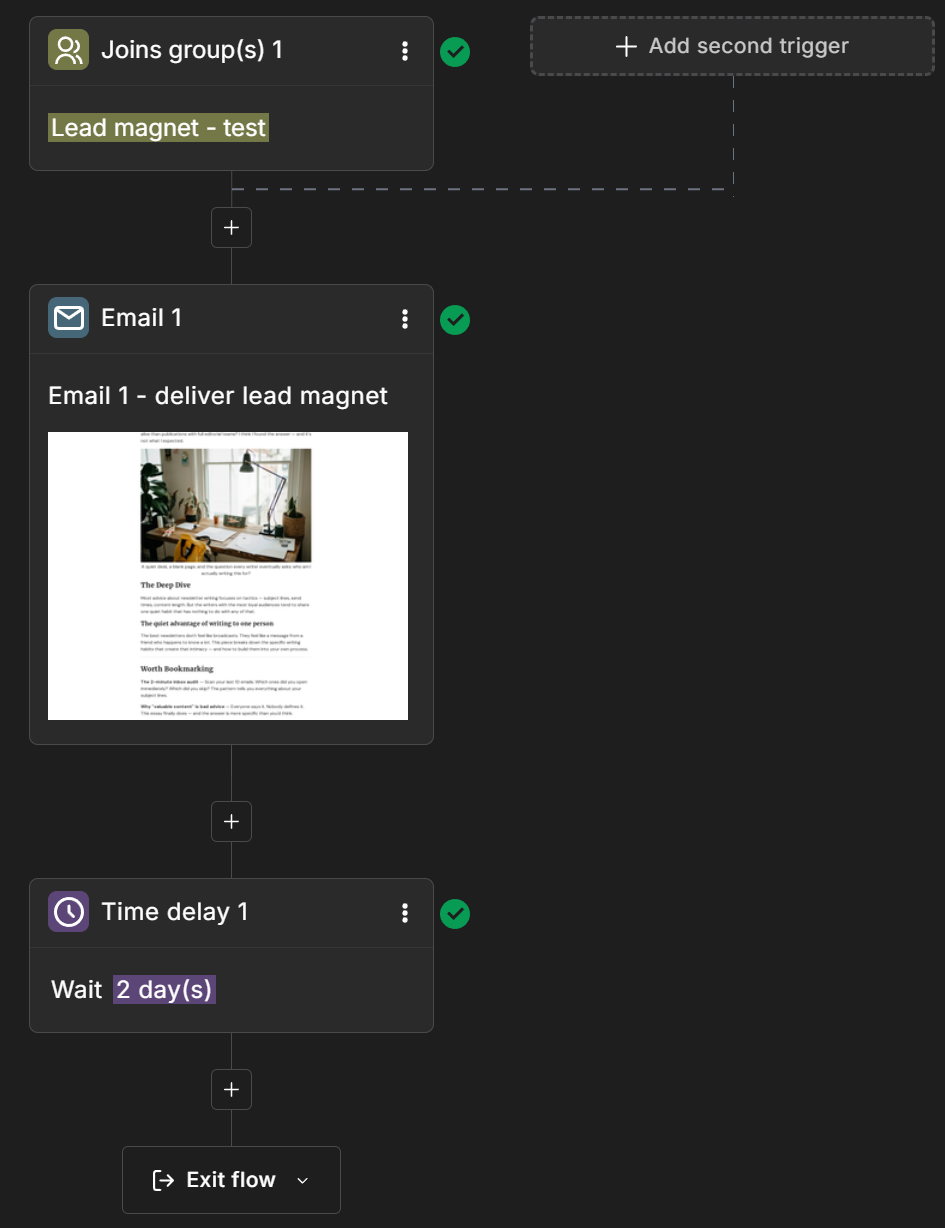
- ☐ 14. Rebuild automations. Mailchimp journeys do not transfer. Rebuild them under Automation → Create workflow. Every MailerLite workflow starts with a trigger (for example, “joins a group”), then actions like Send email and rules like Delay and Condition. (MailerLite — How to create an automation workflow, accessed 2026-10-16.)
- ☐ 15. Update every place a form lives. Website pages, sidebars, pop-ups, link-in-bio tools, WordPress plugins. Search your site for Mailchimp embed code.‡
Phase 4 — Test, then exit
- ☐ 16. Send test emails to yourself. Preview forms, submit a test signup, and trigger each automation with a test address. (Doc-based: MailerLite migration guide, “Test everything.”)
- ☐ 17. Keep Mailchimp open for 2–4 weeks. Run both in parallel until you confirm no form or integration still points to Mailchimp.‡
- ☐ 18. Cancel or pause Mailchimp. In Mailchimp: Account & billing → Settings → Manage my plan, then choose Delete my account or pause the plan. Per Mailchimp’s docs, only Owners/Admins can do this, outstanding balances must be paid first, and deletion is permanent: it removes audiences, campaign archives, and reports. Export everything first. (Mailchimp — Pause or cancel your account, accessed 2026-10-16.)
See MailerLite’s current plans and trial options →
What transfers and what doesn’t
Compiled from the official MailerLite migration guide and Mailchimp export documentation (both accessed 2026-10-16).
| Item | Transfers automatically? | How it moves |
|---|---|---|
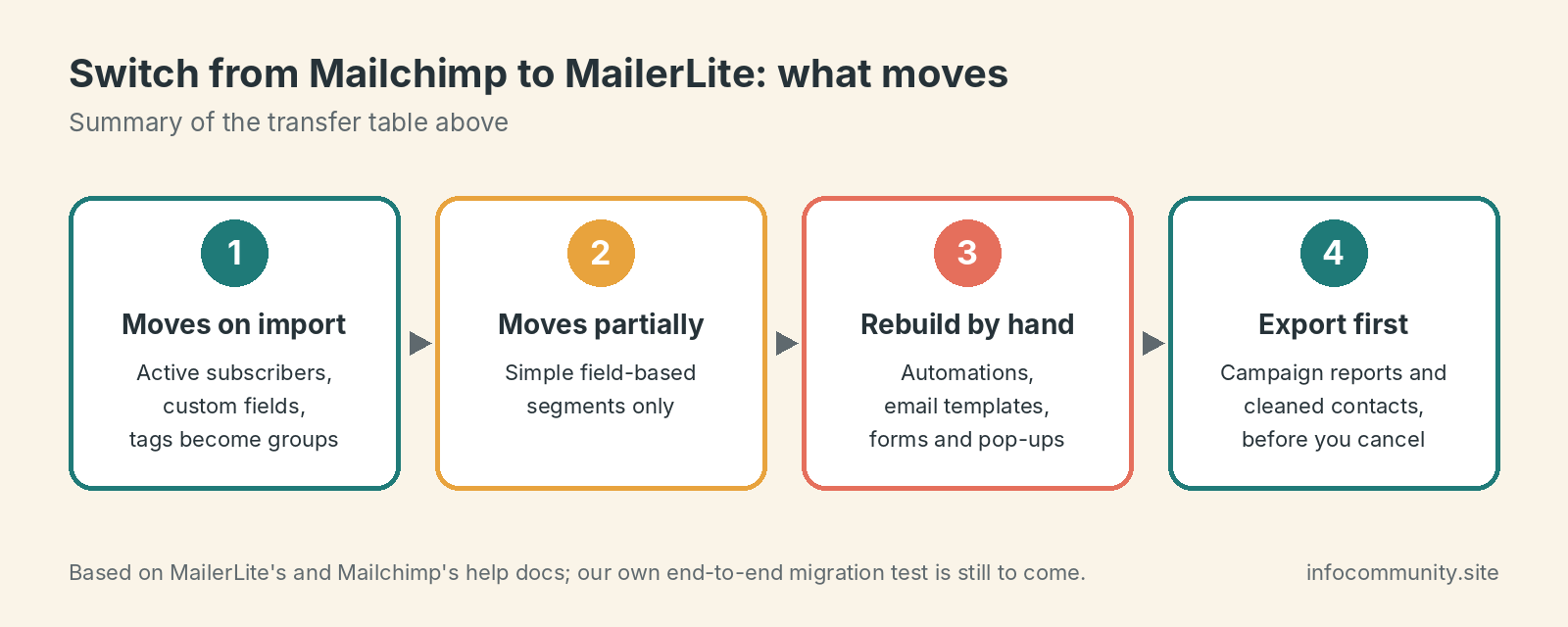
| Subscribers (active) | Yes | Mailchimp import tool or CSV |
| Custom fields / merge fields | Yes | Auto-mapped or manually mapped during import |
| Tags → Groups | Yes | Tags become MailerLite groups (“create groups for each list and tag”) |
| Segments | Partially | Only simple field-based segments; behavioral/e-commerce segments must be rebuilt |
| Automation workflows | No | Rebuild manually in MailerLite Automation |
| Email templates | No | Rebuild in MailerLite’s editor (HTML export from Mailchimp helps) |
| Signup forms and pop-ups | No | Recreate in MailerLite Forms, then swap embed code |
| Unsubscribed contacts | Yes (optional) | Import as Unsubscribed, kept separate from Active and never mailed |
| Bounced/cleaned contacts | CSV only | Keep the Mailchimp “cleaned” CSV as a suppression record |
| Campaign reports/history | No | Export from Mailchimp before canceling; not importable |
Cost after you switch from Mailchimp to MailerLite
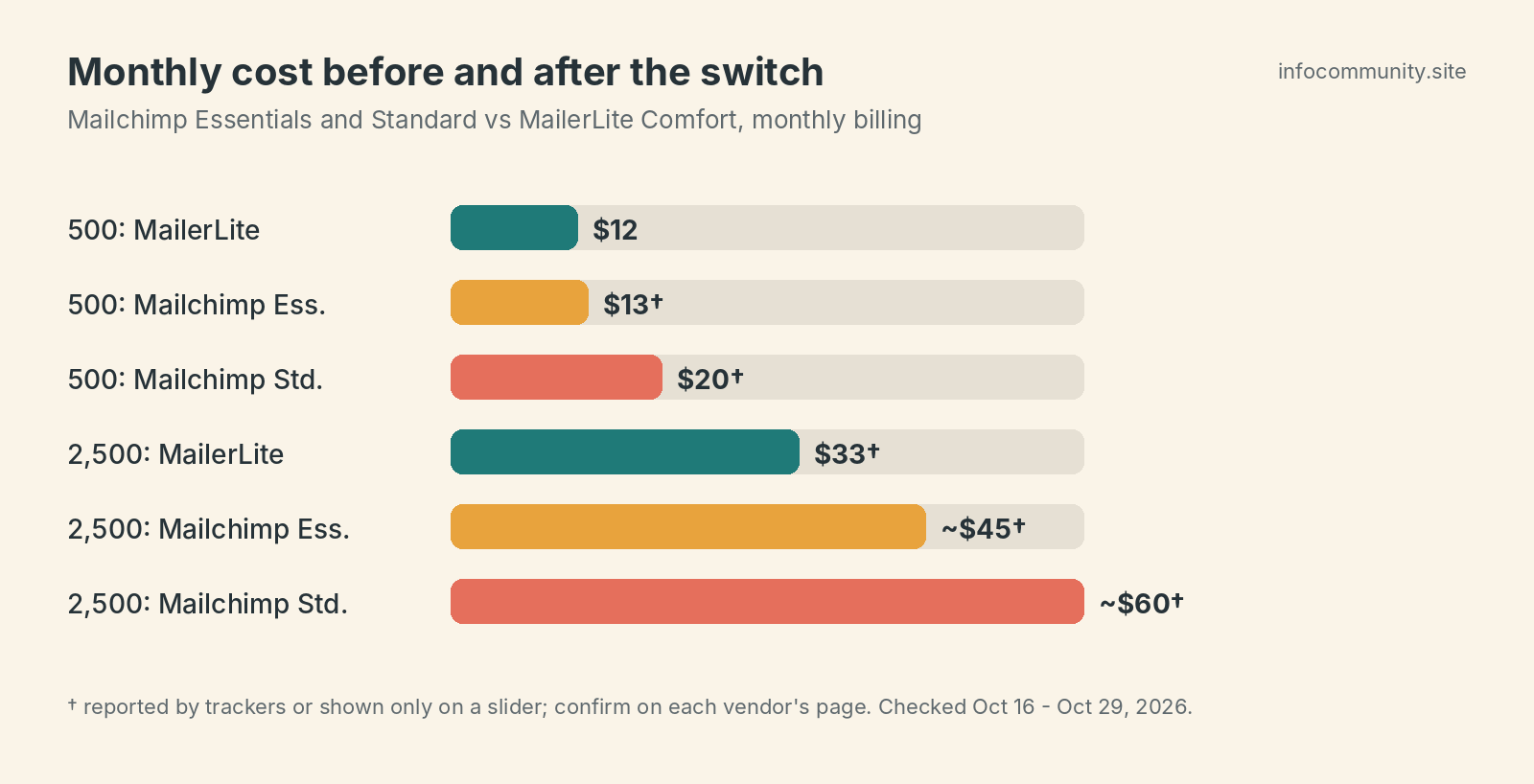
Monthly billing, entry tiers. Mailchimp figures are the regular monthly prices shown on Mailchimp’s own pricing page on November 6, 2026 (new accounts are offered 50% off for the first 12 months); see our Mailchimp pricing guide for the sources. MailerLite’s starting prices are from mailerlite.com/pricing (accessed 2026-10-16); its 2,500-contact figure comes from third-party trackers†.
| Contacts | Mailchimp Essentials | Mailchimp Standard | MailerLite Comfort | MailerLite Power |
|---|---|---|---|---|
| 500 | $13/mo | $20/mo | $12/mo (from) | $25/mo (from) |
| 2,500 | $45/mo | $60/mo | $33/mo | Not confirmed† |
MailerLite’s Comfort plan also includes unlimited templates and dynamic emails†, and automation is available on its free plan†. Mailchimp’s free tier no longer lets you activate automation flows — we checked.
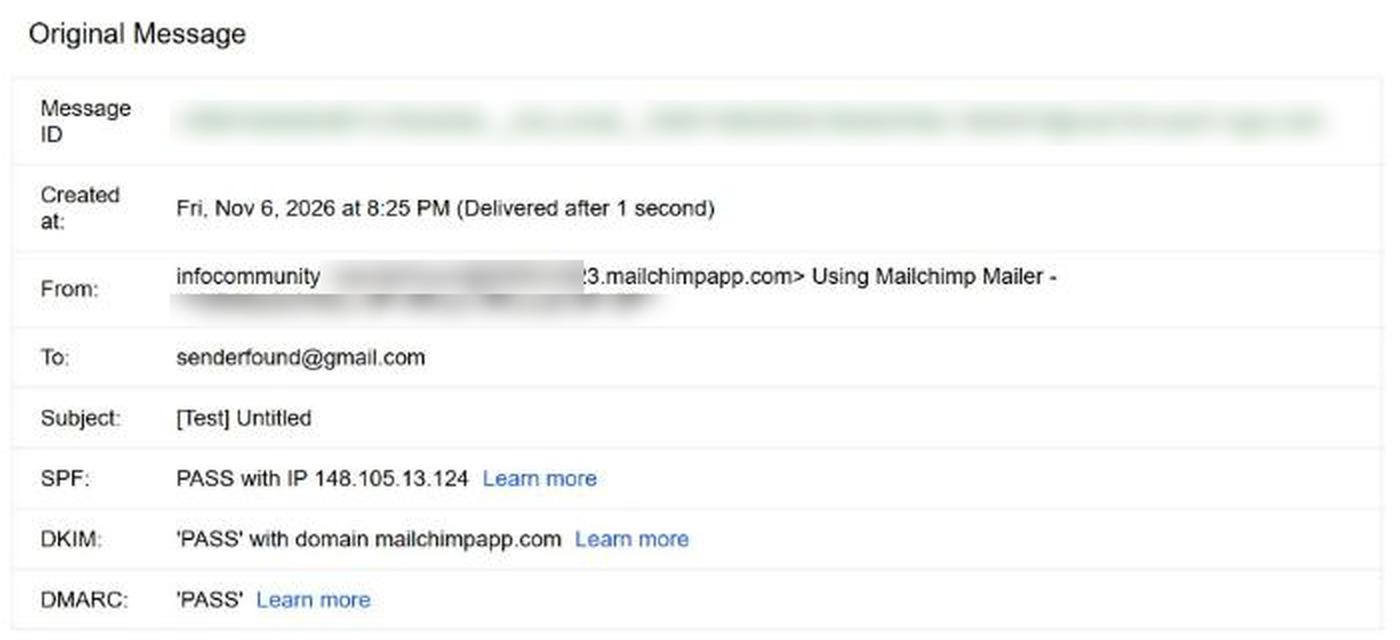
Checked in our own Mailchimp Free account (November 6, 2026): 250 contacts and 500 sends a month; automation flows can be drafted but need a paid plan to go live; a referral badge is added to every footer. We also sent a test email from the free account: Mailchimp replaced our Gmail “From” address with a @…mailchimpapp.com address, and the email reached the Gmail Inbox with SPF, DKIM and DMARC passing. So deliverability is not the reason to leave the free plan — the limits are.
FAQ
Will I lose subscribers when I switch from Mailchimp to MailerLite?
No, if you export all status files and use the import tool. Import unsubscribed contacts as unsubscribed so no opted-out contact is ever mailed.
Do Mailchimp tags carry over?
Yes. MailerLite’s importer converts tags into groups. A subscriber in several groups counts once toward your plan limit (doc-based).
Do my Mailchimp automations transfer?
No. Per both platforms’ documentation, automations and journeys are excluded from exports and imports. Screenshot your workflows and rebuild them in MailerLite’s Automation tab.
How long should I keep my Mailchimp account open?
There is no vendor-prescribed window. We recommend 2–4 weeks of parallel operation so you can catch any website form still pointing at Mailchimp.‡
Can I pause Mailchimp instead of deleting it?
Yes. Per Mailchimp’s help docs, monthly Marketing plans can be paused for 3 or 6 months (up to twice per 12 months)† from Manage my plan. Pausing stops Marketing billing but keeps your data.
Is MailerLite really cheaper?
At the entry tier, slightly: Comfort starts at $12/month versus Mailchimp Essentials at $13†. At 2,500 contacts the reported gap is larger (about $33 versus $45†), but confirm both on the live pricing pages. See our MailerLite vs Kit comparison and Mailchimp alternatives roundup.
† Price or detail reported by third-party trackers or not published as static text on the vendor’s page (many vendors show prices on an interactive slider). Confirm on the vendor’s live page before you buy.
‡ Our own recommendation, not a step documented by the vendor.
Sources and method
Prices and plan limits on this page were checked on the dates shown below. We have not yet published our own hands-on test results for this comparison; where we add them, we will say so and show screenshots.
- mailerlite.com (accessed 2026-10-16)
- mailerlite.com (accessed 2026-10-16)
- mailerlite.com (accessed 2026-10-16)
- mailerlite.com (accessed 2026-10-16)
- mailchimp.com (accessed 2026-10-16)
- mailchimp.com (accessed 2026-10-16)
- mailchimp.com (accessed 2026-10-16)