
Mailchimp pricing in 2026 confuses almost everyone the first time they look at it, and honestly, that’s not your fault. The sticker price you see on the homepage ($13 a month) is real, but it applies to exactly one list size, on one plan, before any of the billing quirks kick in. By the time your list grows and Mailchimp counts contacts you didn’t think counted, the real bill can look very different.
This guide breaks down what each Mailchimp plan actually costs at the list sizes small businesses really have, what changed in 2026 (spoiler: prices went up and the free plan shrank), and the hidden costs that surprise people on their first invoice.
Disclosure: This article may contain affiliate links. If you buy through them, we may earn a commission at no extra cost to you. It never affects our rankings or verdicts. Learn more →
TL;DR: Mailchimp has four plans in 2026: Free (250 contacts), Essentials (from $13/mo), Standard (from $20/mo), and Premium (from $350/mo). After a reported April 2026 price hike of roughly 11–13%†, a 5,000-contact list costs $75–$100/month depending on the plan. Mailchimp counts unsubscribed and cleaned contacts toward your bill unless you archive them, and overage charges apply automatically. It’s a solid tool, but most small lists can get the same job done for less elsewhere.
What changed in Mailchimp pricing in 2026
Two things, and both made Mailchimp more expensive:
- An across-the-board price increase in April 2026. Pricing tracker SMTPedia documented an 11–13% increase on all paid plans in April 2026†, continuing a steady climb since Intuit acquired Mailchimp in 2021. Essentials’ entry price has moved from $9.99/month in 2022 to $13/month today, and Standard from $14.99 to $20 (smtpedia.com, accessed 2026-10-29).
- The free plan shrank to 250 contacts. Once famous for covering 2,000 contacts, the free tier has been cut repeatedly and now sits at 250 contacts with a monthly send cap (500 sends a month — confirmed in our own free account), a 250-per-day cap, no live automation flows, and Mailchimp branding on every email. That’s enough to test the editor, not enough to run a real newsletter.
If you’re an existing customer on a legacy plan, the April hike shows up directly on your bill. If you’re new, you’re paying the new rates from day one.
Mailchimp pricing plans in plain English
Free — $0. Up to 250 contacts, a small monthly send allowance, one user, one audience, and no automation flows you can switch on. Support is limited to your first 30 days†. Go over any limit and sending pauses until you upgrade.
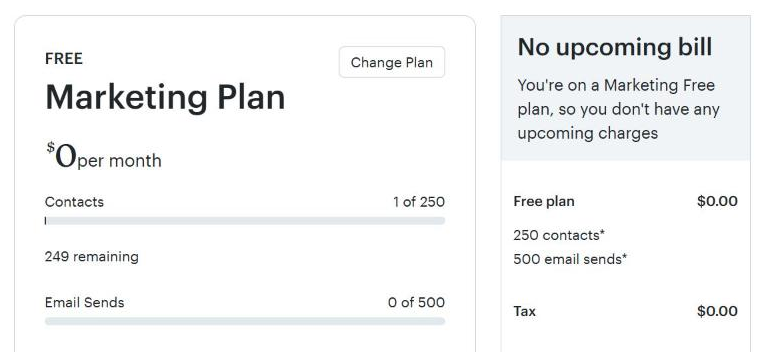
We tested Mailchimp Free ourselves (November 6, 2026). We opened a free account and checked the limits from the inside:
- The plan page shows 250 contacts and 500 email sends per month.
- Automation flows can be built but not switched on: the builder shows “Upgrade to continue” and says Essentials allows 4 steps and Standard 100 steps.
- The 300+ “fully designed” templates ask you to upgrade to Essentials; only the basic layouts are free.
- A referral badge is added to every email footer, and test-email links expire after 72 hours.
- Mailchimp swapped our Gmail “From” address for a @…mailchimpapp.com address. Our test email still landed in the Gmail Inbox with SPF, DKIM and DMARC all passing.
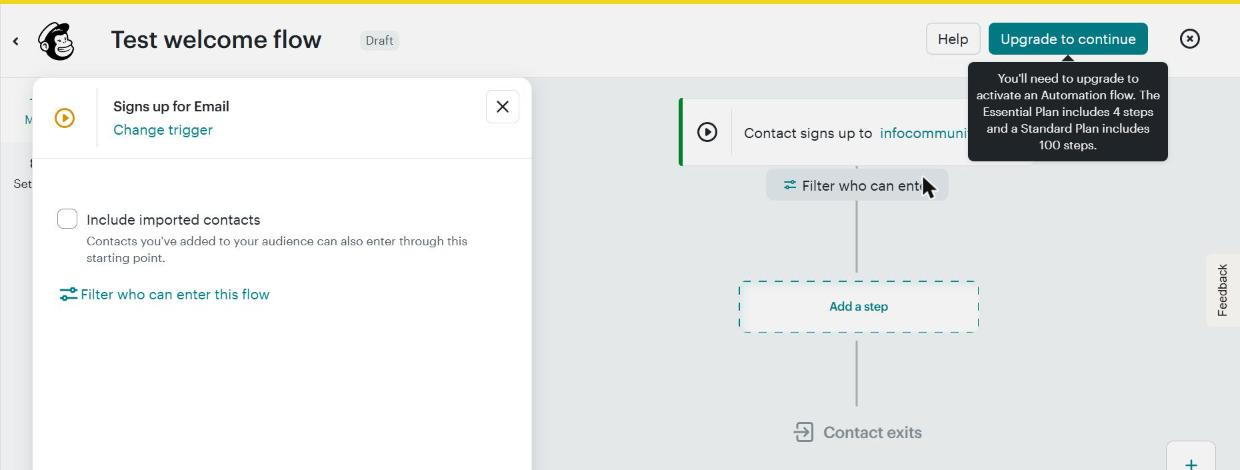
Essentials — from $13/month. Removes the branding, lifts sends to 10x your contact count, adds 3 users and 3 audiences, 24/7 email and chat support, and simple automations — capped at 4 steps per flow. That 4-step cap is the reason most growing businesses end up upgrading.
Standard — from $20/month. The plan Mailchimp pushes hardest, and the one most small businesses actually need. Sends rise to 12x your contacts, you get 5 users and 5 audiences, A/B and multivariate testing, dynamic content, and up to 200 automation flows (Mailchimp’s pricing page, Nov 6, 2026; the in-app upgrade notice says Standard flows can have up to 100 steps).
Premium — from $350/month. Starts at the 10,000-contact tier. Unlimited users and audiences, 15x sends, advanced segmentation, and phone support. For most small businesses this is overkill.
All paid plans are billed by contact count, and unlike most competitors, Mailchimp doesn’t appear to offer a meaningfully discounted annual prepay on marketing plans†. There’s a 14-day free trial on Essentials and Standard, and trackers report 15% off the first year for accounts with 10,000+ contacts, but the list prices below are what you pay after promotions end.
One more structural point: your monthly send allowance scales with your plan, not your wallet. Essentials lets you send 10 times your contact count per month, Standard 12 times†, Premium 15 times†. At 5,000 contacts that’s 50,000 sends on Essentials — far more than a normal newsletter schedule needs. Send volume is rarely the reason to upgrade; features and contact tiers are.
Which plan should you pick?
Match the plan to the job, not the brand:
- Just testing email marketing, under 250 contacts: Free is fine for now — but treat it as a trial, because you’ll outgrow it fast.
- A simple newsletter or promo blasts, small team: Essentials. You get branding removal, scheduling, and basic automation without paying for features you won’t touch.
- Welcome sequences, abandoned-cart flows, A/B testing, or more than 3 users: Standard. The 4-step automation cap on Essentials is the wall most growing businesses hit first.
- 10,000+ contacts, big team, need phone support: Premium — but at that size, also get quotes from competitors before you commit.
Now the numbers.
What you actually pay, by list size
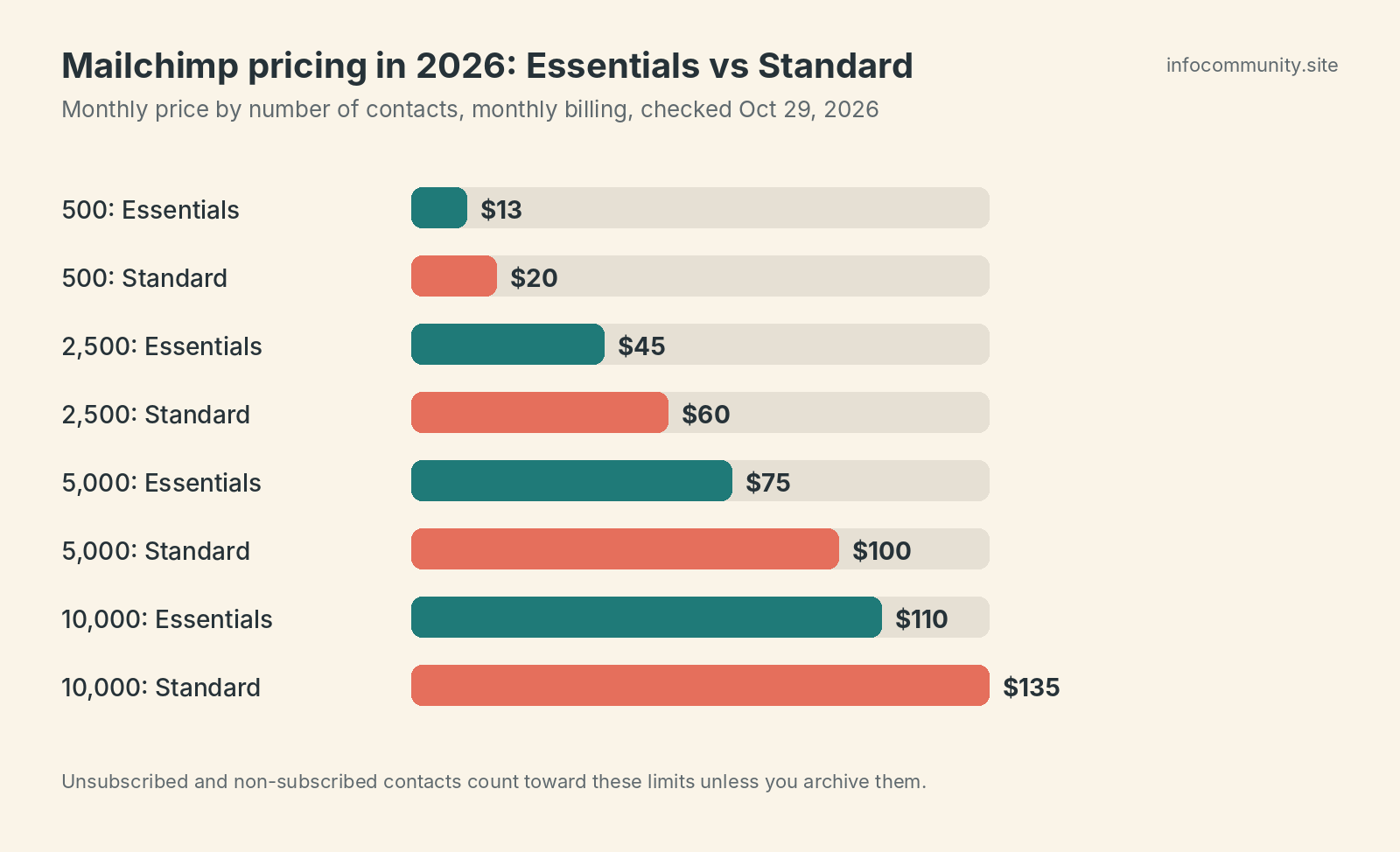
Here’s the table the pricing page makes you work for. Monthly list prices, USD, as reported consistently by several pricing trackers in 2026:
| Contacts | Free | Essentials | Standard | Premium |
|---|---|---|---|---|
| 500 | $0 (max 250) | $13/mo | $20/mo | $350/mo* |
| 2,500 | — | $45/mo | $60/mo | $350/mo* |
| 5,000 | — | $75/mo | $100/mo | $350/mo* |
| 10,000 | — | $110/mo | $135/mo | $350/mo |
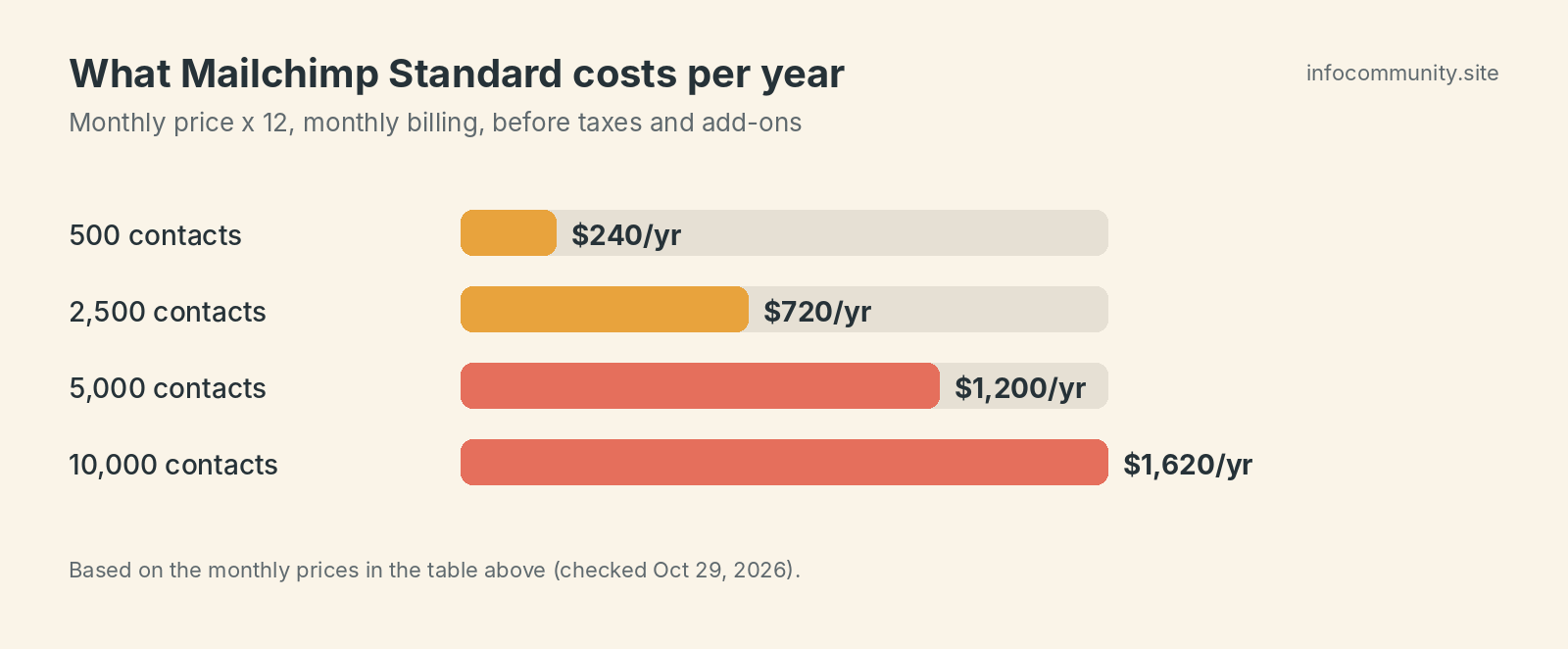
*Premium’s $350/month entry price covers up to 10,000 contacts and isn’t sold below that tier, so it’s shown for comparison only — paying $350 for a 500-contact list makes no sense.
These Essentials and Standard figures match at least five independent trackers (SendX, Moosend, GroupMail, SalesHandy and TinyCommand). A few outliers differ, so confirm your exact list size on mailchimp.com before you decide.
How we calculated: These figures are compiled from independent 2026 breakdowns (SendX, Moosend, GroupMail, SalesHandy, TinyCommand, and TechRadar for the entry prices). We could not read Mailchimp’s own plan calculator, so confirm on mailchimp.com. They exclude promotional discounts, sales tax, SMS add-ons, transactional email, and overage charges. Mailchimp reprices tiers without much notice, so run your exact contact count through its plan calculator before signing anything.
Two patterns stand out. First, the price roughly doubles every time you move from 2,500 to 5,000 to 10,000 contacts — the meter runs on contacts, not on how much you send. Second, the gap between Essentials and Standard stays surprisingly small in dollar terms ($7–$25/month at these sizes). If you need real automation, Standard is usually worth the jump; if you just send a monthly newsletter, Essentials is enough.
The hidden costs nobody reads about
This is where Mailchimp bills get weird. Three things to understand before you commit:
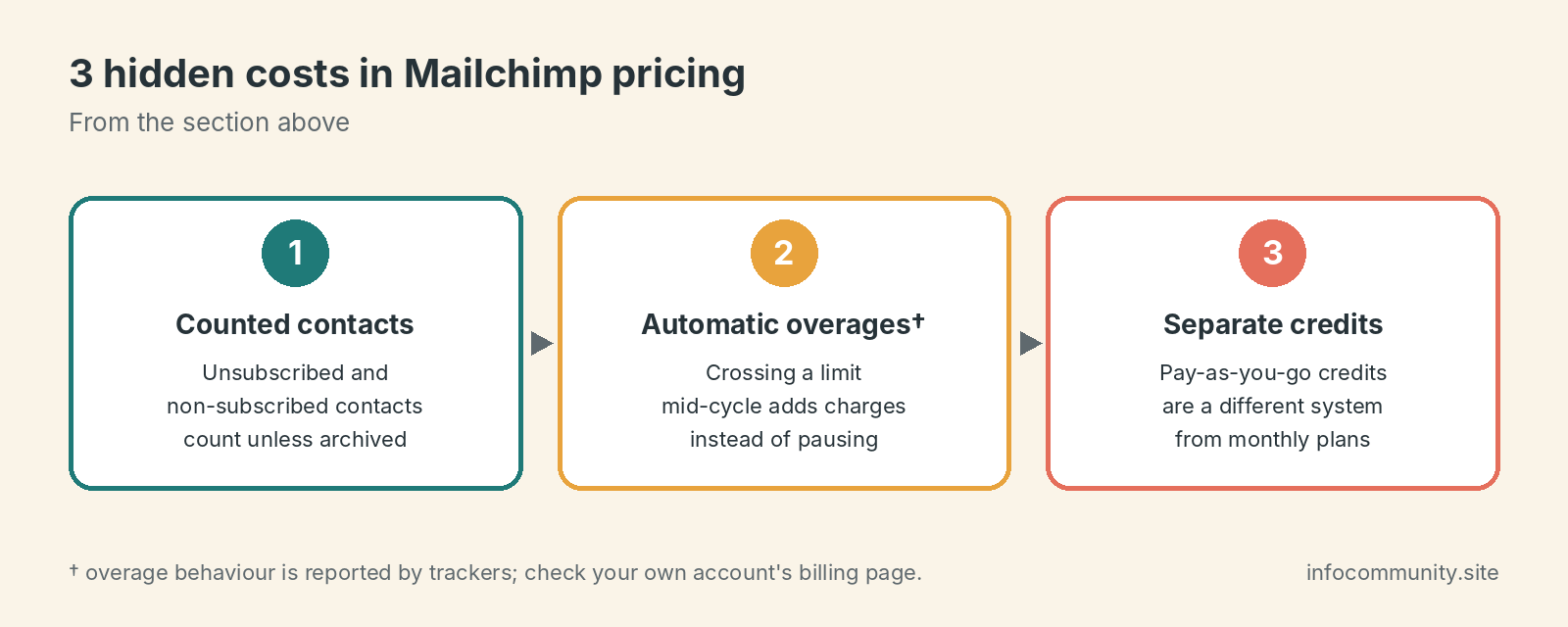
1. Mailchimp counts contacts you can’t even email. Subscribed, unsubscribed, and non-subscribed contacts in your audience all count toward your plan’s contact limit, according to pricing trackers summarizing Mailchimp’s help center (SendX lists “charges for unsubscribes: yes, unless archived”). So a list of 4,000 subscribers plus 1,500 people who unsubscribed years ago bills you at the 5,000+ tier — $75–$100/month instead of $45–$60. The fix: regularly archive (don’t delete, archive) unsubscribed and cleaned contacts. Archived contacts reportedly don’t count†. This single habit can cut your bill by a tier.
2. Overages are charged automatically. On paid plans, if you cross your contact or send limit mid-cycle, Mailchimp reportedly doesn’t pause your campaigns — it bills the overage automatically†. That’s friendlier than a hard stop, but it means a viral week or a big import can quietly bump you into the next pricing band. On the free plan it’s the opposite: sending just stops.
3. Pay-as-you-go credits are a separate system. If you send rarely — say, four campaigns a year — Mailchimp sells email credits in blocks (starting at 5,000 credits; trackers quote different prices†) instead of a monthly plan. Credits can’t be combined with a monthly subscription, and each send to each contact burns one credit. It’s genuinely cheaper for infrequent senders, but do the math: 2,000 contacts times 6 sends a year is 12,000 credits, and once you’re sending monthly, a low-tier Essentials plan usually wins.
Also budget for extras if you need them: SMS marketing and transactional email (Mandrill) are paid add-ons, and phone support only exists on Premium†.
Is Mailchimp worth it in 2026?
Yes, if you rely on Mailchimp’s 300+ integrations†, want a polished editor your whole team already knows, or need Standard’s automation depth and don’t mind paying for it. It’s a capable, well-documented platform, and at 500 contacts the $13–$20 entry prices are fair.
No, if price is your main constraint. After the April 2026 hike, a 5,000-contact list costs $75–$100/month — and several respected competitors charge roughly half that. MailerLite’s free plan covers 250 subscribers, and its paid plans stay dramatically cheaper as you grow, with a similar drag-and-drop editor (see our switching guide). See MailerLite’s plans → Brevo prices by emails sent rather than contacts stored, which flips the math entirely if you have a big list you email infrequently. See Brevo’s pricing →
The honest verdict: Mailchimp in 2026 is the brand-name option. You’re paying a premium for the ecosystem and the familiarity, and the free plan is now too small to be a real starting point. If your tools already depend on it, stay. If you’re starting fresh, shop around first. And whichever way you go, export and archive your stale contacts before your next billing date — it’s the fastest saving in email marketing.
Frequently asked questions
Does Mailchimp charge for unsubscribed contacts?
Yes, according to pricing trackers summarizing Mailchimp’s help center. Unsubscribed and non-subscribed contacts count toward your plan limit unless you archive them, and archived contacts are reportedly excluded from billing†.
Is Mailchimp still free?
Yes, but only up to 250 contacts, with a small monthly send cap (trackers cite 500†), no automation flows†, and limited support†.
Can I get a discount?
Trackers report a 15% first-year discount for accounts with 10,000+ contacts, and Mailchimp has been reported to offer a 15% nonprofit discount†; confirm with Mailchimp support. We found no meaningful annual prepay discount on marketing plans†.
Keep reading
- 7 cheaper Mailchimp alternatives — real prices, honest trade-offs
- How to switch from Mailchimp to MailerLite — a step-by-step migration guide
- MailerLite vs Kit — which budget-friendly tool fits your list
† Price or detail reported by third-party trackers or guides, or not published as static text on the vendor’s page (many vendors show prices on an interactive slider). Confirm on the vendor’s live page before you buy.
Sources and method
Mailchimp figures on this page come from the independent trackers and publications below, not from our own reading of Mailchimp’s plan calculator. We have not tested Mailchimp hands-on for this article.
- mailchimp.com (accessed 2026-10-29)
- sendx.io (accessed 2026-10-31)
- moosend.com (accessed 2026-10-31)
- groupmail.io (accessed 2026-10-31)
- saleshandy.com (accessed 2026-10-31)
- tinycommand.com (accessed 2026-10-31)
- techradar.com (accessed 2026-10-31)
- smtpedia.com (accessed 2026-10-29)
- activecampaign.com (accessed 2026-10-29)