

Kit vs Mailchimp is one of the most common choices a new creator faces. Mailchimp is the name everyone knows; Kit (formerly ConvertKit) was built for people who sell what they know. In 2026 the gap between them is bigger than most comparisons admit, starting with the free plans: Kit is free up to 10,000 subscribers, Mailchimp up to 250 contacts. This guide compares the two on dated prices and on what we saw in our own accounts.
Disclosure: This article may contain affiliate links. We are a Kit affiliate (through PartnerStack), so we may earn a commission if you start a paid Kit plan. We are not a Mailchimp affiliate. It never changes our verdicts. Learn more.
TL;DR
- Pick Kit if you are a creator building a list, especially above 250 subscribers: the free plan alone covers 10,000 subscribers.
- Pick Mailchimp if you run a store or service business that depends on its integrations and you need cheap paid automation at 1,000 to 5,000 contacts (Essentials).
- Watch the bill: Mailchimp counts unsubscribed contacts unless you archive them; Kit charges a 3.5% + $0.30 fee on products you sell through it.
Kit Black Friday deal (until December 1, 2026, 11:59 PM PT): 60% off the Kit Creator plan for your first three months when you sign up through our link, according to Kit’s affiliate team. The free plan (up to 10,000 subscribers) is unchanged. See the Kit offer →
We earn a commission if you upgrade through this link. Check the final price on Kit’s checkout page.
In this comparison
Kit vs Mailchimp: prices at 1,000, 5,000 and 10,000 subscribers
Monthly billing, USD. Mailchimp prices were read on its own pricing page on November 6, 2026 (regular price after the 12-month intro discount). Kit’s $39 Creator price at 1,000 subscribers was read on Kit’s in-app billing page the same day; higher Kit tiers come from trackers†.
| Plan | Free plan | 1,000 | 5,000 | 10,000 |
|---|---|---|---|---|
| Kit Newsletter (free) | Up to 10,000 subscribers | $0 | $0 | $0 |
| Kit Creator | – | $39 | $89† | $139† |
| Mailchimp Free | 250 contacts, 500 sends | – | – | – |
| Mailchimp Essentials | – | $26.50 | $75 | $110 |
| Mailchimp Standard | – | $45 | $100 | $135 |
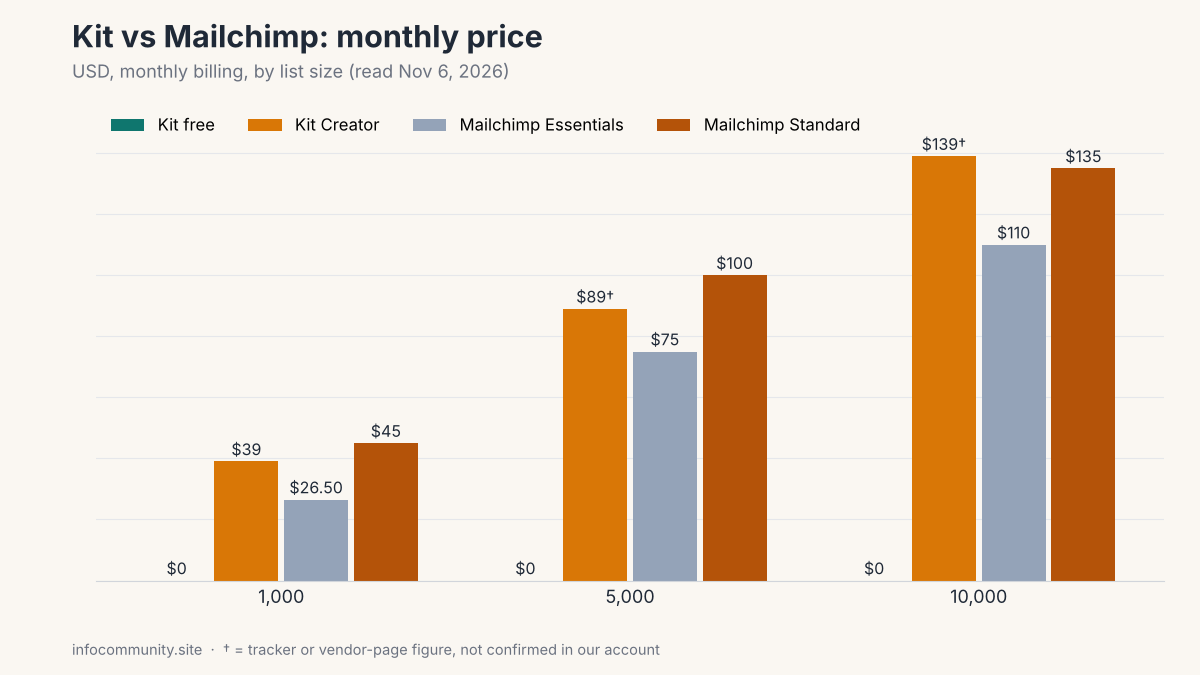
Read this Kit vs Mailchimp table carefully. On paid plans Mailchimp Essentials is cheaper than Kit Creator at every size here. But a creator with 1,000 to 10,000 subscribers who only needs broadcasts, forms and landing pages can stay on Kit’s free plan (an automated welcome sequence needs Creator) and pay nothing, while Mailchimp’s free plan stops at 250 contacts.
What we saw in our own Kit and Mailchimp accounts
For this Kit vs Mailchimp comparison we opened both accounts in November 2026. What we checked:
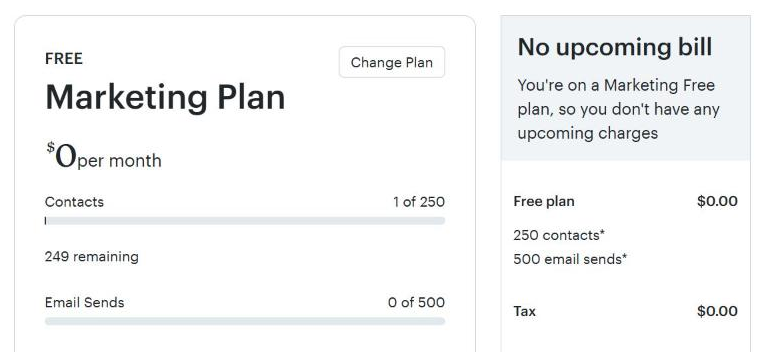
- Mailchimp Free (November 6, 2026): the billing page shows 250 contacts and 500 sends per month. Automation flows can be drafted, but the builder says you must upgrade to activate them (Essentials allows 4 steps, Standard far more). A Mailchimp referral badge is added to the email footer. A test email reached our Gmail inbox with SPF, DKIM and DMARC passing.
- Kit (November 6, 2026): a new account starts a 14-day Creator trial with no card; a pop-up asks for card details, and “I’ll do this later” skips it. The billing page showed Creator at $39 a month or $390 a year up to 1,000 subscribers. When our trial ended on November 20, 2026, Kit did not move the account to the free plan on its own: it paused the account on a page asking for a card or a plan choice, with a “Downgrade to free” button. Nothing was charged. If you only want the free plan, click Downgrade to free when your trial ends.
Not tested yet: Kit’s free-plan limits after the trial (we will add a dated check), and sending to a real list on either tool.
Kit vs Mailchimp features: where each one wins
| Need | Kit | Mailchimp |
|---|---|---|
| Big free list | Wins (10,000 free) | 250 contacts |
| Automation on the free plan | None (checked in our account on November 20, 2026) | Cannot activate flows |
| Selling digital products and paid newsletters | Built in (3.5% + $0.30 fee) | Possible via integrations |
| Integrations with stores and CRMs | Good for creator tools | Wins (largest library) |
| Designed templates | Simple, text-first | Many (most need Essentials) |
| Tags vs audiences | One list with tags | Separate audiences can double-count |
Where Kit vs Mailchimp tilts to Kit
Kit treats every subscriber once and organizes them with tags, which suits creators with several lead magnets. Its commerce tools let you sell an ebook or a paid newsletter without another platform, for a fee of about 3.5% + $0.30 per sale. And the free plan is generous enough that many people never need Creator until they want more automation.
Where Kit vs Mailchimp tilts to Mailchimp
Mailchimp is the safer pick when your shop, booking tool or CRM already connects to it, and when you want heavily designed emails. Essentials is also cheaper than Kit Creator at 1,000 to 10,000 contacts if you need paid automation. Just remember that unsubscribed contacts count toward your bill unless you archive them, and that Essentials limits flows to 4 steps.
See Mailchimp’s current prices →
Who should choose which
| Your situation | Better pick | Why |
|---|---|---|
| Creator, 250 to 10,000 subscribers, newsletter first | Kit | Free plan covers it |
| Creator selling a course or ebook | Kit | Commerce built in |
| Online store or service business on Mailchimp integrations | Mailchimp | Integrations and templates |
| Need full automation at 1,000 to 5,000 contacts on a budget | Mailchimp Essentials or MailerLite | Lower paid price |
If neither side of the Kit vs Mailchimp choice fits, our cheaper Mailchimp alternatives and Kit alternatives cover the rest, and Mailchimp pricing in 2026 explains every Mailchimp cost.
FAQ
Is Kit better than Mailchimp in 2026?
For creators, Kit usually wins the Kit vs Mailchimp question: the free plan covers up to 10,000 subscribers. For stores that depend on integrations, Mailchimp can still be the better tool.
Is Kit cheaper than Mailchimp?
On the free plan, by far. On paid plans, Mailchimp Essentials is cheaper than Kit Creator at 1,000 ($26.50 vs $39), 5,000 and 10,000 subscribers.
Can I move from Mailchimp to Kit?
Yes. Export your Mailchimp audience as a CSV and import it into Kit; keep the unsubscribed contacts out. Check our migration checklist for the general steps.
Does Kit take a cut of sales?
Kit charges about 3.5% + $0.30 per transaction on digital products and paid newsletters, on top of payment processing.
† Price or detail reported by third-party trackers or not yet confirmed in our own account. Confirm on the vendor’s live page before you buy.
Sources and method
- Mailchimp pricing: Essentials and Standard by contact count (read 2026-11-06).
- Kit pricing and Kit Help Center: free plan up to 10,000 subscribers (checked 2026-11-06).
- Our own accounts: Mailchimp Free (plan page, automation upgrade wall, test send, 2026-11-06); Kit (trial and billing page, 2026-11-06).